
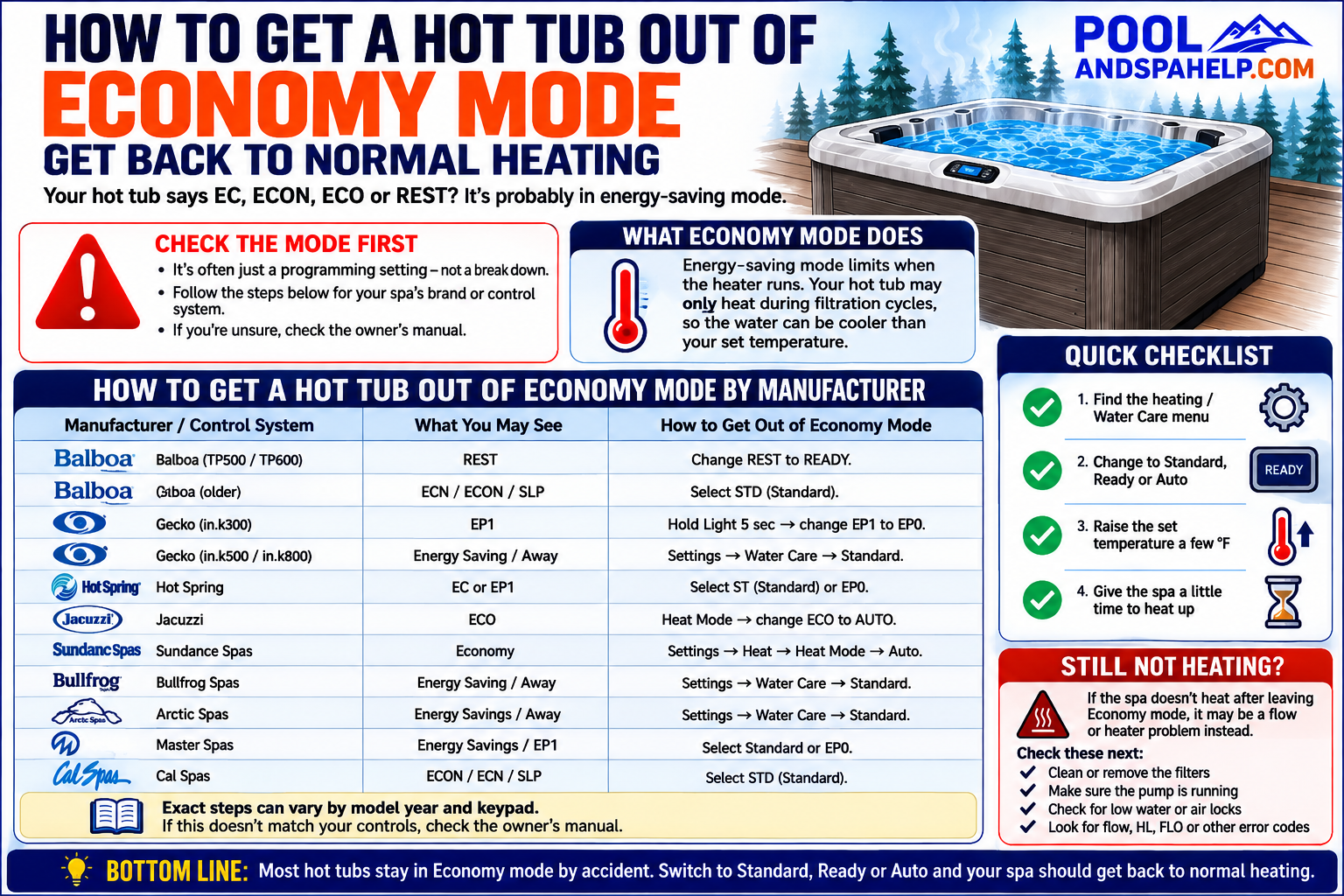
Your hot tub says EC, ECON, ECO, REST, or Economy, and now the water isn’t staying as warm as you expect.
In many cases, nothing is actually wrong with the heater.
The hot tub may simply be programmed to heat only during certain times or filtration cycles.
Getting it back to normal heating is usually fairly simple — but the exact procedure depends on the manufacturer, model year, control system, and keypad.
Below, I’ll cover the most common ways to get a hot tub out of Economy mode, including Balboa, Gecko, Hot Spring, Jacuzzi, Sundance, Bullfrog, Arctic Spas, Master Spas, and Cal Spas.
Important: Hot tub manufacturers change control systems and keypads between models and model years. The instructions below cover common configurations, but they may not match every spa. If your controls look different, check the owner’s manual for your specific model and year before changing programming.
How Do I Turn Off Economy Mode?
You need to change the hot tub from its energy-saving heating mode back to its normal heating mode.
Depending on the control system, that might mean changing:
- EC / ECON → STD
- REST → READY
- ECO → AUTO
- EP1 → EP0
- Energy Savings → Standard
If you don’t see the words Economy Mode, don’t worry. Manufacturers use several different names for essentially the same type of heating strategy.
The table below will help you find the most likely procedure for your hot tub. However, due to the differences between brands and years, you may need to refer to the owner’s manual.
How to Turn Off Hot Tub Economy Mode by Manufacturer
| Manufacturer / Control System | What You May See | How to Get Out of Economy Mode |
|---|---|---|
| Balboa TP500 / TP600 | REST | Change the heating mode from REST to READY. Depending on the keypad, Mode may be accessed through the menu or with the temperature and Light buttons. |
| Older Balboa Controls | ECN, ECON, Economy, SLP | Select STD (Standard). Many older Balboa keypads use the Mode/Prog button or a Temp + Light sequence to change operating modes. |
| Gecko in.k300 | EP1 | Hold Light for about 5 seconds to enter programming. Advance until EPx appears and change EP1 to EP0. EP0 disables Economy mode. |
| Gecko in.k500 / in.k800 / similar controls | Energy Savings, Super Energy Savings, Away, Weekender | Go to Settings → Water Care → Standard. |
| Hot Spring Hot Spot – some models | EC | Enter the operating-mode programming menu and select ST (Standard). Some keypads use the Mode button and temperature buttons to change this setting. |
| Hot Spring Hot Spot – other controls | EP1 | Hold Light for about 5 seconds, advance through programming until the Economy setting appears, and change EP1 to EP0. |
| Jacuzzi | ECO | Enter the Heat Mode menu and change ECO to AUTO. Some older Jacuzzi controls use a Mode button to switch between Economy and Standard operation. |
| Sundance Spas | Economy | Go to Settings → Heat → Heat Mode and select Auto. Older models may use a different procedure. |
| Bullfrog Spas – newer controls | Energy Saving, Super Energy Saving, Away, Weekender | Go to Settings → Water Care → Standard. |
| Bullfrog Spas – older controls | ECN, Economy | Many older models use Balboa-style controls. Change the operating mode to Standard using the appropriate Mode or Temp/Light sequence. |
| Arctic Spas – newer Classic controls | Away, Energy Savings, Weekender | Go to Settings → Water Care → Standard. |
| Arctic Spas – some Core / older controls | Economy | Enter the programming menu, commonly by holding Light, locate the Economy setting, and disable it. Exact procedures vary by keypad and year. |
| Master Spas – newer Gecko-style controls | Energy Savings, Away, Weekender | Go to Settings → Water Care → Standard. |
| Master Spas – other controls | EP1, ECON, Economy | Disable the Economy setting or select Standard, depending on the control system installed in the spa. |
| Cal Spas – newer Gecko-style controls | Energy Saving, Away, Weekender | Go to Settings → Water Care → Standard. |
| Cal Spas – older Balboa-style controls | ECON, ECN, SLP | Select STD (Standard) using Mode/Prog or the appropriate keypad combination. |
Why Doesn’t My Hot Tub Actually Say “Economy”?
This causes a lot of confusion.
Economy mode isn’t one universal setting used by every hot tub manufacturer.
One spa might display EC, while another displays ECON. A newer Balboa system may call its reduced heating mode REST, while a Gecko-equipped spa may put its energy-saving options under Water Care.
That’s why you may see terms such as:
- EC
- ECON
- ECO
- REST
- Energy Saving
- Super Energy Saving
- Away
- Weekender
- EP1
They don’t all operate in exactly the same way, but each can affect when the hot tub is allowed to heat.
If you’re not sure what your particular setting means, check the owner’s manual before changing it.
Balboa Economy Mode: READY vs REST
Balboa deserves a little extra explanation because its controls are installed in hot tubs made by many different manufacturers.
On newer Balboa systems, you may not see the word Economy at all.
Instead, you may see:
READY
or
REST
In READY mode, the hot tub monitors the water temperature and can run the pump and heater as needed to maintain your selected temperature.
In REST mode, heating is generally restricted to programmed filtration cycles.
So if your complaint is:
“My hot tub only seems to heat at certain times.”
Check whether the display says REST.
Changing it to READY may be all that’s required.
Older Balboa systems often use STD, ECN, and SLP instead.
For normal heating, select STD (Standard).
Gecko Economy Mode
Gecko controls are also installed in many different brands of hot tubs.
Older or simpler Gecko keypads may use an EP setting.
Typically:
EP0 = Economy disabled
EP1 = Economy enabled
More advanced Gecko controls commonly place these settings under Water Care.
If you want the spa operating normally, select:
Settings → Water Care → Standard
Be careful not to assume something is wrong with the heater if you find the spa set to Away, Energy Savings, Super Energy Savings, or Weekender. Those settings may intentionally prevent the spa from maintaining the temperature the way you expect.
Why Did My Hot Tub Go Into Economy Mode?
Usually, a hot tub doesn’t randomly decide to enter Economy mode.
Someone may have accidentally changed the setting while adjusting the temperature, filtration cycles, or other programming.
It may also have been intentionally programmed that way by:
- The previous owner
- A service technician
- A dealer
- Another member of the household
- Someone trying to reduce electricity use
If you recently purchased a used hot tub and it doesn’t seem to maintain temperature, checking the heating mode is one of the first things I’d look at.
Will My Hot Tub Heat Immediately After Leaving Economy Mode?
Usually it should begin heating once the control system sees that the water temperature is below the set temperature, although you may not see the heater indicator come on the instant you change the setting.
Try raising the set temperature a few degrees above the current water temperature.
Then give the control system a moment to respond.
If the heater indicator appears and the spa begins heating, Economy mode was likely the issue.
If it doesn’t, you may have a different problem.
Hot Tub Still Not Heating After Turning Economy Mode Off?
If you’ve switched the spa to Standard, Ready, or Auto and it still won’t heat, don’t immediately assume the heater element has failed.
In my experience, water-flow problems are one of the first things worth checking.
Start with the filter.
I’ve been to plenty of service calls where a filter looked perfectly clean but was restricted enough to reduce water flow through the heater. Removing the filter temporarily for troubleshooting can quickly tell you whether it is contributing to the problem.
Other possibilities include:
- Low water level
- An air lock after refilling the spa
- A circulation-pump problem
- A dirty or restricted filter
- A pressure or flow-switch problem
- A high-limit condition
- A heater-element problem
- Another control-system fault
If the spa is displaying a FLO, FLOW, HL, OH, or another error message, troubleshoot that condition rather than continuing to change the heating mode.
Economy Mode or Heating Problem?
Here’s a simple way to tell the difference.
If the hot tub does eventually reach the set temperature but only heats during certain times, check the operating mode first.
That behaviour can be completely normal in an Economy or Rest mode.
If the hot tub never reaches the set temperature, displays an error, or doesn’t show any sign that the heater is being activated, you may be dealing with an actual heating or flow problem.
Changing Economy mode won’t fix a failed component.
Frequently Asked Questions
What does EC mean on a hot tub?
EC commonly indicates Economy mode. In Economy mode, the spa may only heat during programmed filtration cycles rather than maintaining the selected temperature continuously.
The exact meaning can vary by control system, so check your owner’s manual if you’re unsure.
How do I get my hot tub out of EC mode?
On many older Balboa-style controls, change the operating mode from EC or ECN to STD (Standard).
The button sequence varies by keypad. Some use a Mode/Prog button, while others use a combination of the temperature and Light buttons.
What does REST mean on a hot tub?
On many newer Balboa controls, REST is a heating mode that generally allows heating during programmed filtration cycles.
For normal temperature maintenance, change REST to READY.
What is EP1 on a hot tub?
On some Gecko controls, EP1 means Economy mode is enabled.
Changing the setting to EP0 disables the Economy period.
Should my hot tub be in Standard or Economy mode?
If you use the hot tub regularly and want it ready at your selected temperature, Standard, Ready, or Auto is usually the more convenient setting.
Economy modes can make sense when you don’t need the spa maintaining its normal temperature throughout the day.
Why is my hot tub colder in Economy mode?
Economy mode may restrict when the heater operates. Instead of heating whenever the water drops below the set temperature, the spa may wait until a programmed filtration or heating period.
That means the displayed water temperature can fall below your set temperature between heating periods.
The Bottom Line
Getting a hot tub out of Economy mode is usually a programming change rather than a repair.
The challenge is figuring out which control system you have.
If you see REST, look for READY.
If you see EC, ECN, or ECON, look for STD or Standard.
If you see ECO, look for AUTO or Standard.
If you see EP1, look for EP0.
And on newer menu-driven controls, look under Heat Mode or Water Care for a Standard setting.
Just remember that manufacturers have used different control systems over the years. If the procedure in the table doesn’t match the buttons or menus on your spa, find the model and year and check the appropriate owner’s manual rather than guessing.
Once you’ve confirmed the spa is back in its normal heating mode, and it still won’t heat, it’s time to troubleshoot the heating system rather than Economy mode.
Related Articles:
- Hot Tub Economy Mode
- Hot Tub Not Heating Past 80 Degrees
- Hot Tub Error Codes – Meanings, Causes, and Troubleshooting
- Hot Tub Isn’t Heating? Here’s What to Check Before Calling for Service
Written by Dan Harvickson (Founder of Last Mountain Tech) Pool and Spa Specialist